Introduction
What is Payment Links API?
The Payment Links API creates a hosted InvinciblePay payment page that merchants can share directly with customers to collect an Interac e-Transfer.
Unlike the Checkout API, which is typically used as part of an online checkout process, Payment Links are designed to be distributed independently through email, SMS, invoices, messaging applications, QR codes, or any other communication channel.
InvinciblePay provides:
- Merchant name
- Receiving e-Transfer email
- Exact payment amount
- Unique reference code
- Expiration countdown timer (when applicable)
- "I've Sent My Payment" button
Customer Experience
The customer opens the hosted payment link and sees the following information:
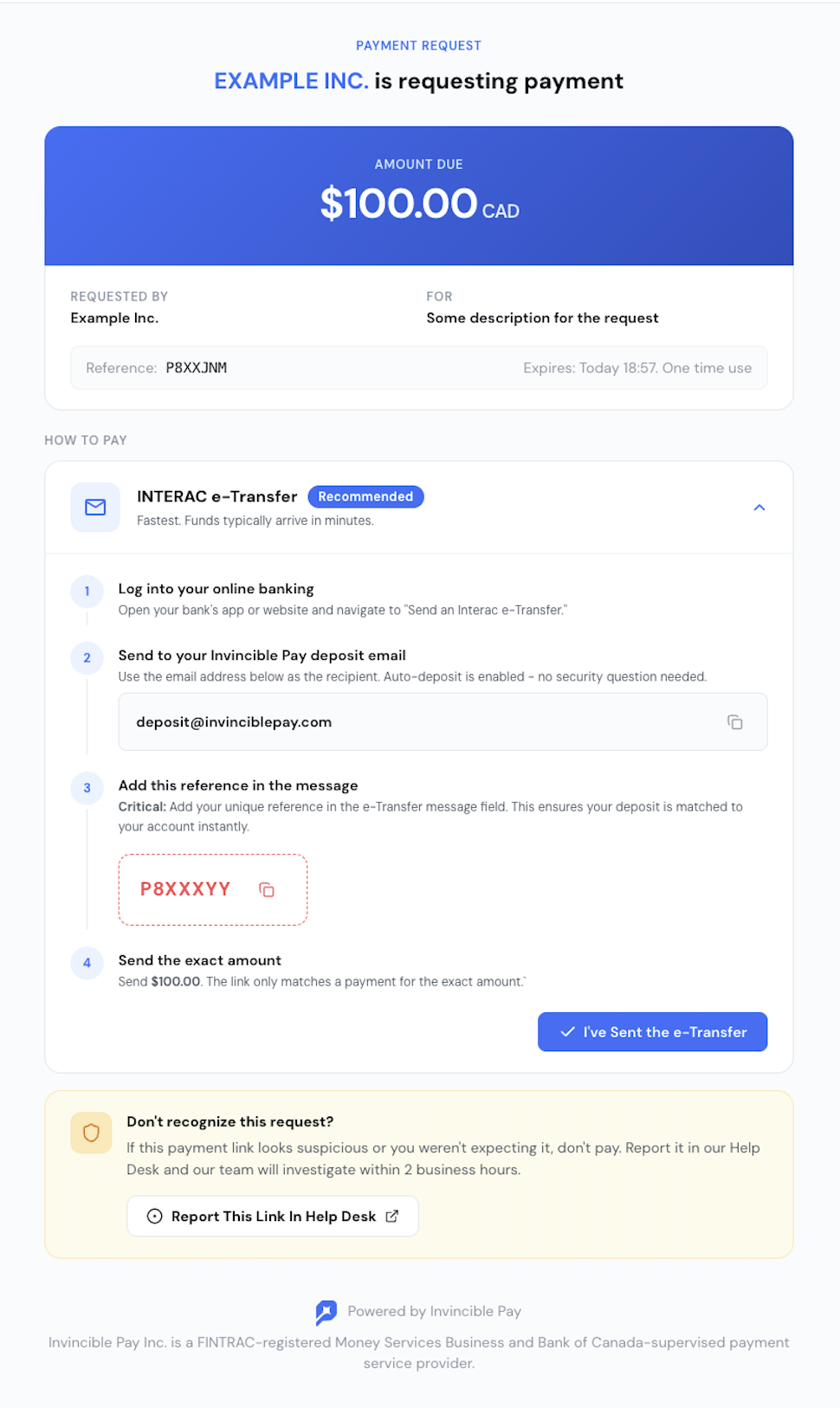
- Merchant Name - The merchant receiving the funds. Example: EXAMPLE Inc.
- Expiration Timer - Shows how much time remains before the payment link expires, if an expiration has been configured. Example: 57m 4s
- Receiving e-Transfer Email - The email address to which the customer sends the Interac e-Transfer. Example: pay@cadpayment.ca
- Amount - The exact amount the customer must send. Example: $100.00 CAD
- Reference Code - A unique identifier generated by InvinciblePay. Example: P8XXXYY. The customer must include this code in the e-Transfer message or note. InvinciblePay uses this code to automatically match the incoming payment to the Payment Link.
- "I've Sent the e-Transfer" Button - After sending the e-Transfer from their banking application, the customer clicks this button to notify InvinciblePay.
Important: Clicking this button does not mean the payment succeeded. It only informs InvinciblePay that the customer claims they initiated the transfer. The merchant should not consider the payment complete until InvinciblePay confirms it.
Recommended Integration Model
Merchant applications should use:
- Webhooks - recommended
- Polling - fallback option
Webhooks notify your backend whenever a Payment Link changes state.
Register your webhook URL
Register a URL to receive webhook notifications using POST /v1/webhook-urls. Example body:
{
  "url": "https://myfencestore.com/api/invinciblepay/webhook"
}
You can also: list your registered webhook URLs with GET /v1/webhook-urls, and manage an existing webhook URL:
The API also exposes a webhook history/list endpoint at GET /v1/webhooks.
Payment Link Flow
The merchant creates an invoice, payment request, or order in their own system. Example:
invoice_id = INV-10045
amount = 100.00
currency = CAD
payment_status = pending
Your backend creates an InvinciblePay Payment Link using POST /v1/payment-links. Example body:
{
    "fundingSourceId": "fs_123",
    "amount": "100.00",
    "currency": "CAD",
    "description": "Invoice INV-10045",
    "externalId": "INV-10045",
    "expiresIn": 3600
}
InvinciblePay returns:
payment_link_id = pl_123
payment_url = https://app.invinciblepay.com/p/xxxxxxxx
status = pending
Your application sends the returned payment_url to the customer by email, SMS, invoice, QR code, or any other communication channel.
- The customer opens the Payment Link.
The customer sends an Interac e-Transfer using their banking application, for example:
Recipient: pay@cadpayment.ca
Amount: $100.00
Message: P8XXXYY
The customer clicks "I've Sent my e-Transfer."
InvinciblePay receives the e-Transfer.
InvinciblePay automatically matches the payment using:
- reference code
- amount
- merchant funding source
- recipient email
- The Payment Link status becomes completed.
- InvinciblePay sends a webhook.
- Your backend retrieves the Payment Link and confirms:
status == completed - Your backend marks the invoice, order, or payment request as paid.